The editor we've
been waiting for
Godot is a Lisp-extensible code editor with an Electron presentation layer. It runs on a custom dialect of Lisp where every command, every keystroke, every face is defined as data — not buried in plugin manifests or configuration JSON. Behind that surface: tree-sitter highlighting for 36 languages with cross-language injection, Sublime-style multi-cursor, a per-pane tabline tree, drag-resizable splitters, citation.js for bibliography work, a real shell on xterm.js, and a face system you can customise live without restarting.
And the newest layer is an editor that extends itself: an in-app Claude agent you converse with in a pane — it designs and builds new views, applies them live, and (with your approval) drives the editor and edits your documents — sitting on a custom-element view system that can host anything in a tab, from a Pac-Man homage to a full Atari emulator. There's also a complete LaTeX / RefTeX / SyncTeX stack with inline math preview, a yasnippet-style snippet engine, edit-tracking bookmarks, and a three-book in-app manual.
It's the editor I've been writing while waiting to find the editor I actually wanted to use.
Vladimir: Well? Shall we go?
Estragon: Yes, let's go.
(They do not move.) — Samuel Beckett, Waiting for Godot
Overview
Godot is what happens if you take Emacs's idea — that an editor is a programming environment, not a frozen feature set — and rebuild it in 2026 with the tools available now: tree-sitter for parsing, Electron for rendering, a custom Lisp dialect that fits a modern editor instead of fighting one.
It is not a fork of Emacs, Vim, Sublime, or VSCode. It is its own thing, written from the ground up around a five-layer architecture (storage → buffer → view → renderer → host) where each layer is small enough to read in one sitting and each layer is exposed to Lisp at exactly the seams where extension makes sense.
Lisp-first
Every command is a defcommand. Every setting is a defcustom. Every face is a defface. You read the source by reading the data.
Tree-sitter throughout
36 languages with full grammar parsing — and cross-language injection, so CSS inside <style> blocks gets coloured by the CSS highlighter, not the HTML one.
Multi-cursor that means it
Cursor sets live on the view, not the buffer — two views over one file keep independent multi-cursor state. C-c d, C-c D, ESC.
Real panes with tablines
Splits that can hold tabline-views with configurable edges, drag-resizable widths, and views you can send between panes by name.
Faces are data
The colour palette is a hash-map. The themes are hash-maps. M-x customize-faces changes them live — no restart, no rebuild.
Beyond text
Finder-style directory column browser, image and audio views, an album-art jukebox, a real terminal on xterm.js. All in the same tab-strip as your code.
An editor that extends itself
An in-app Claude agent — M-x claude — that builds new views and drives the editor on command, gated by your approval.
Any element is a view
Register any web component as a pane view in ~6 lines of Lisp — from a kanban board to a full Atari emulator running in a tab.
Philosophy
Godot is built on a handful of opinionated decisions. They are not novel — they are not even contrarian — they are simply followed through in a way most editor projects abandon when the prototype meets the feature checklist.
Lisp at the seams, not the engine
The text storage, the rendering, the tree-sitter integration, the file IO — all of these are JavaScript, where they belong. The keymap, the commands, the modes, the themes, the customisation system, the editing primitives that the user reaches for — these are Lisp, where they belong. The dividing line is at the points where the user might reasonably want to change behaviour. Below the line is performance; above the line is opinion.
Sync Lisp is a feature, not a bug
When you press x, the Lisp (insert! "x") runs inside the keypress handler, on the same tick. There is no event loop between the keystroke and the buffer mutation. This is what lets defcommand compose cleanly with the keymap, the modes, the undo stack, the chord-prefix display. Asynchronous extension is more general; synchronous extension is more honest to the editing model.
Halfway between Python and Perl
Allow unusual configurations; do not encourage them. Defaults should be capable, not constrained — but exotic combinations are the user's responsibility. The library is small, the primitives are sharp, the path of least resistance leads to readable code.
View is the addressable thing
What you point at, switch to, kill, and configure is the view — not the buffer underneath. A view has a kind (text, image, audio, shell, tabline, …). A text view has a buffer; other kinds carry their own state. Two text views over one buffer keep independent cursors, marks, scroll positions, and (now) cursor sets. The buffer is L2 infrastructure; the view is what the user means.
Quick Start
Once the binary is built (status: pre-release, see Status):
The first launch creates ~/Library/Application Support/Godot/init.lisp with a commented template. Read it for the conventions; you'll add your own commands and bindings there.
Useful keystrokes to know immediately:
| C-x C-f | Find a file (with case-insensitive completion) |
| C-x b | Switch to a view by name |
| C-x 2 / C-x 3 | Split the current pane vertically / horizontally |
| C-x o | Move focus to the next pane |
| C-c d | Add a cursor at the next match of the word at point |
| M-x | Run any command by name (with tab completion) |
| C-h k | Describe a key — press the chord you want explained |
Panes & Tablines
Godot's editor area is a tree. Each leaf is a pane; each split is an internal node with an orientation and a ratio. Drag the splitter to resize; C-x + to balance; spatial navigation with C-x C-← / → / ↑ / ↓.
A pane can hold a single view directly, or it can hold a tabline-view — a structural wrapper that adds a tab strip plus a content area. The strip can sit on any edge (top, bottom, left, right) and its width (for vertical edges) is drag-resizable and persisted across restart.
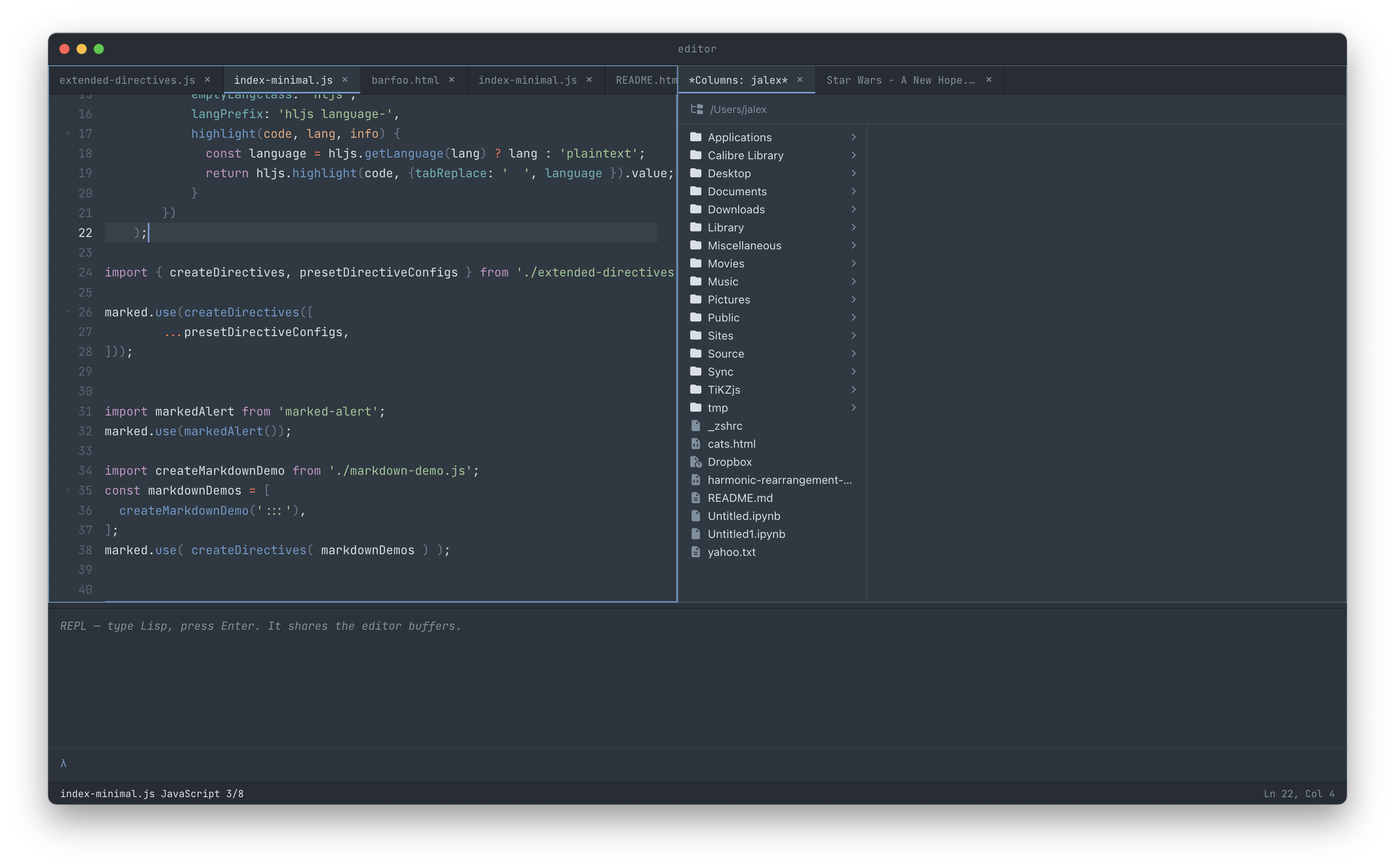
Move views between panes
The architecture supports moving a view from one pane's tabline to another, swapping the contents of two panes wholesale, and promoting a plain leaf to a tabline on the fly:
| C-x x | send-view-to-other-pane — moves the focused tab to the next pane |
| C-x X | swap-with-other-pane — exchange the contents of two panes |
M-x close-pane | Collapse the focused pane; the view stays alive in the global list |
M-x close-tab | Drop the active tab from its strip; same view-stays-alive guarantee |
| C-x k | kill-view — actually remove the view from the global list |
The split between close (view stays alive, retrievable by name) and kill (view actually gone) is Godot's analogue to Emacs's C-x 0 vs C-x k — except Godot works with views, not buffers. A view is what you addressed when you opened it; closing the pane doesn't change that.
Inactive panes fade their cursors and stop blinking, so at a glance you always know which pane will receive your next keystroke.
Multi-cursor
Sublime-style multi-cursor with one subtle difference: the cursor set lives on the view, not the buffer. Two views over one buffer keep independent cursor sets. When you collapse, you collapse this view's set; the other view's cursors are untouched.
| Keys | Action |
|---|---|
| C-c d | First press selects the word at point; subsequent presses add a cursor at the next match. |
| C-c D | Select every occurrence at once. Type to replace, arrow to position, ESC to drop the selections. |
| ESC | Clear all selections without collapsing the cursor set. The cursors remain as bare carets for typing prefixes / suffixes. |
| C-g | Full reset: clear selections and collapse to the primary cursor. |
Every cursor blinks in unison — secondary cursors restart their animation in lockstep with the primary on every render, so a long-lived multi-cursor session doesn't drift into phase soup.
Arrow keys with marks
When a mark is set, arrow keys extend or shrink the selection (the Emacs convention). To drop the selection without killing the cursor set, press ESC; arrow keys then move the cursors as bare carets. S-arrow always extends explicitly.
Tabs & Indentation
Tab handling that gets Makefiles right. Two settings drive everything:
| Setting | Default | Effect |
|---|---|---|
*tab-width* | 4 | Visual width of a literal \t AND the number of spaces insert-tab emits when tabs-mode is off. |
*indent-tabs-mode* | #f | When #t, Tab inserts a literal tab character; otherwise *tab-width* spaces. |
Each major mode can pin a mode-local :indent-tabs? or :tab-width override. Makefile-mode pins :indent-tabs? #t regardless of your global preference — because a Makefile recipe with leading spaces is a hard error from make, not a style choice.
The renderer threads *tab-width* all the way through cursor positioning math: a literal tab spans n visual columns, the cursor lands at the right edge of the glyph, mouse clicks land at the right column. Customise *tab-width* live via M-x customize and every visible editor re-renders in step.
(defcustom *tab-width* 4 :number
  :group 'editing
  :doc "How many columns wide a tab character should appear...")

;; Makefile-mode pins this on regardless of the global setting.
(define-mode makefile-mode
  :name "Makefile"
  :comment-prefix "# "
  :indent-tabs? #t)
Syntax Highlighting
Godot ships 36 vendored tree-sitter grammars covering most languages anyone actually writes day to day — and a few they don't. The interesting feature is not the count but the cross-language injection: an HTML file's <style> block parses as CSS, its <script> block as JavaScript, a Markdown fence as whatever info_string says, a PHP file as HTML containing PHP containing whichever language the <?php … blocks switch to.
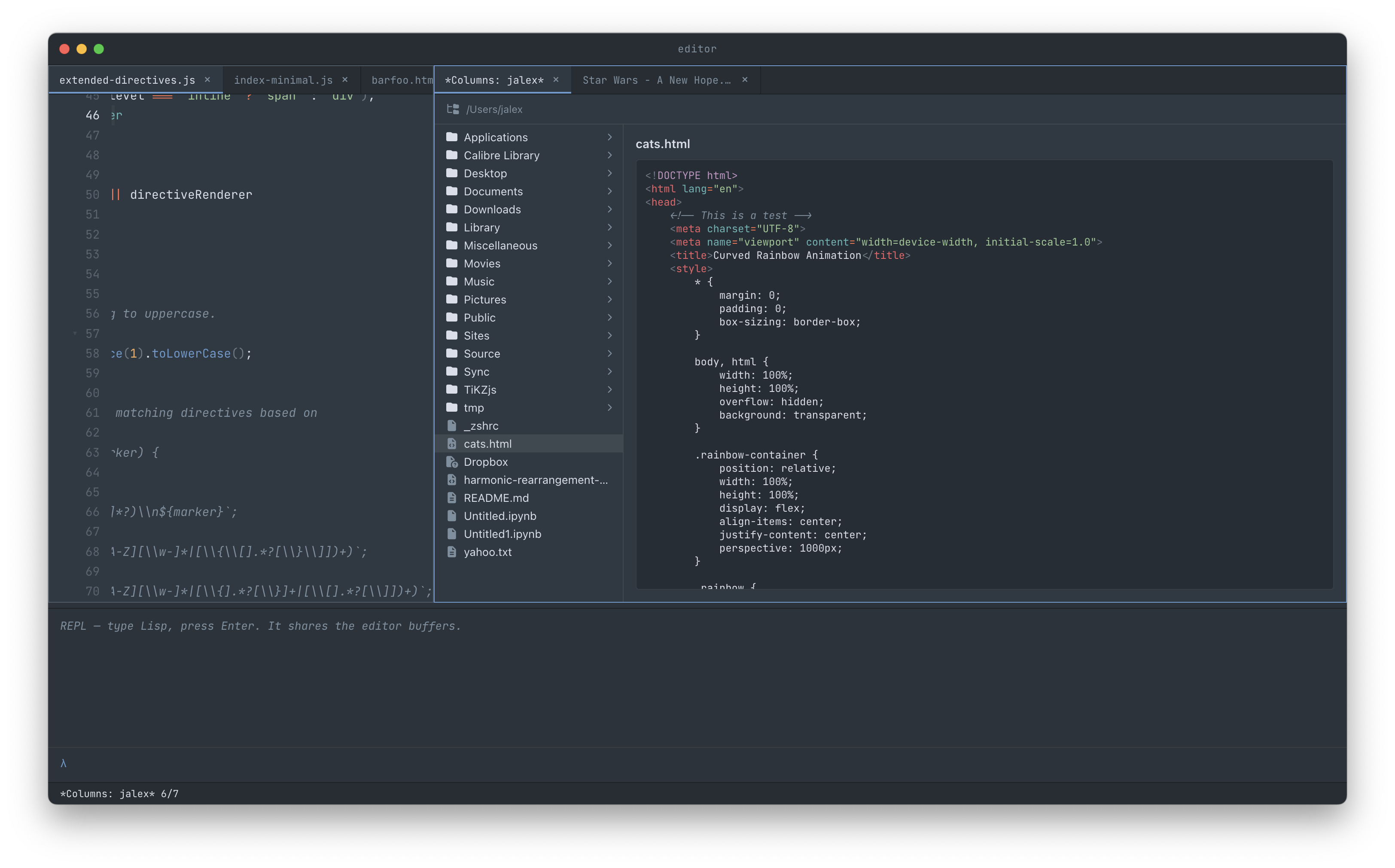
<style> by the CSS grammar.Languages
Bash, C, C++, C#, Clojure, CSS, Dockerfile, Elixir, Erlang, Go, GraphQL, Haskell, HTML, Java, JavaScript, JSON, Kotlin, LaTeX, Lua, Makefile, Markdown (block + inline), Nix, OCaml, PHP, Python, Ruby, Rust, Scheme, SQL, Swift, TOML, TypeScript, XML, YAML, Zig.
The custom Lisp dialect doesn't have a grammar — it has a hand-tokeniser in highlight.js, which doubles as the fallback for any language whose grammar fails to load.
Faces are data
Token colours come from a defface registry, with per-theme defaults for each face:
(defface 'keyword
  :doc "Language keywords (if, return, def, let, lambda, ...)"
  :default-dark     (face :foreground "#c594c5")
  :default-bright   (face :foreground "#d56bff")
  :default-light    (face :foreground "#859900")
  :default-midnight (face :foreground "#ff7b72"))
Override any face via M-x customize-faces — the changes apply live (no restart) and persist to faces.json.
Code Folding
Tree-sitter–driven folding for any language whose grammar ships a fold query. Click the chevron in the gutter, or use C-c TAB at point.
Folded headers show both ends
A collapsed <script> block doesn't render as <script> … with the close hidden. It renders as <script>…</script> with the closing tag syntax-highlighted. Same for function foo() {…}, <div class="row">…</div>, any structure with a meaningful terminator.
The ellipsis is yellow (drawing the eye to "there's content here") and the closing-token preview is rendered through the same highlighter as the surrounding code, so it reads as part of the source rather than a static label.
Smart fold detection
HTML void elements (<meta>, <br>, <img>, <link>) don't grow stray fold chevrons. The query restricts to elements with both a start and an end tag — the kind that meaningfully can fold.
Folds that follow injection
Folding crosses language boundaries the same way highlighting does. In a PHP file the HTML structure folds; in an HTML file the <script> block's JavaScript folds — an injected grammar's fold queries are merged into the host's, so a structure folds as whatever language it actually is.
Indent guides & the fold rail
Vertical indent guides trace the nesting (rainbow-tinted, so matched depths share a colour), and a fold rail in the gutter shows where every foldable scope begins and ends at a glance. Under the Nova theme the gutter draws scope bars in the editor's own palette.
| C-c TAB | Toggle the fold at point |
| C-c C-, | Fold every foldable scope in the buffer |
| C-c C-. | Unfold everything |
Find-file
Path completion in the minibuffer. Case-insensitive by default (togglable via *find-file-case-sensitive*) so the leaf readme.md completes the same way whether you typed it as r or R. The longest common prefix preserves the actual on-disk case as it expands.
Tab cycles through completions if there are several. Files dispatch by suffix: image files open in the image view, audio in the audio view (with the embedded album art if present), video in the video view, everything else in a text buffer with the right major mode picked from the suffix.
The candidate list also surfaces as a clickable Completions tab in the bottom utility dock — scroll it, single-click to fill, double-click to open a file or descend into a directory. It clears itself the moment you submit or cancel.
Snippets Shipped
A yasnippet-style template engine. Type a trigger, press TAB, and it expands into a template with tab-stops you cycle through (TAB / S-TAB), mirrors that echo a field live as you type it, and default values you can overtype. Each field renders as a pill-styled decoration, so you can see the shape of what you're filling in before you fill it.
Snippets are plain files in the user-data directory, grouped by major mode — so a for snippet in python-mode is a different file from for in js-mode, and the buffer's mode decides which one expands. Multi-cursor composes: expand the same snippet at every cursor at once and each instance tracks its own fields independently.
# snippets/js-mode/forof — trigger: "forof"
for (const ${1:item} of ${2:items}) {
  $0
}Open a
.js buffer, type a snippet trigger, press TAB.Bookmarks Shipped
Emacs-style bookmarks that track edits. A bookmark isn't a line number — it's a marker on the buffer's L2 layer, so when you insert text above it the bookmark moves with its line rather than pointing at the wrong place. Set one with C-x r m, jump with C-x r b, list them with C-x r l.
The bookmark list is a view in its own right — a document-order outline of every mark in the buffer; click to jump. Bookmarks persist across quit in a .godot-metadata sidecar beside the file, so relaunching lands every mark exactly where the intervening edits moved it.
| C-x r m | Set a bookmark at point |
| C-x r b | Jump to a bookmark by name |
| C-x r l | Open the bookmark outline view |
Directory Views
Two ways of browsing a folder, both first-class views that can sit in any pane.
Tree view
A vertical list of entries with FontAwesome icons. Folders expand on click; files route through the same open-by-path machinery as the find-file dialog, so they land in whichever view their suffix maps to. Arrow keys navigate; Enter activates; q dismisses.
Column view
A Finder-style horizontal browser. Click a folder, a new column appears to its right with that folder's contents. Click a file, the trailing column becomes a preview pane.
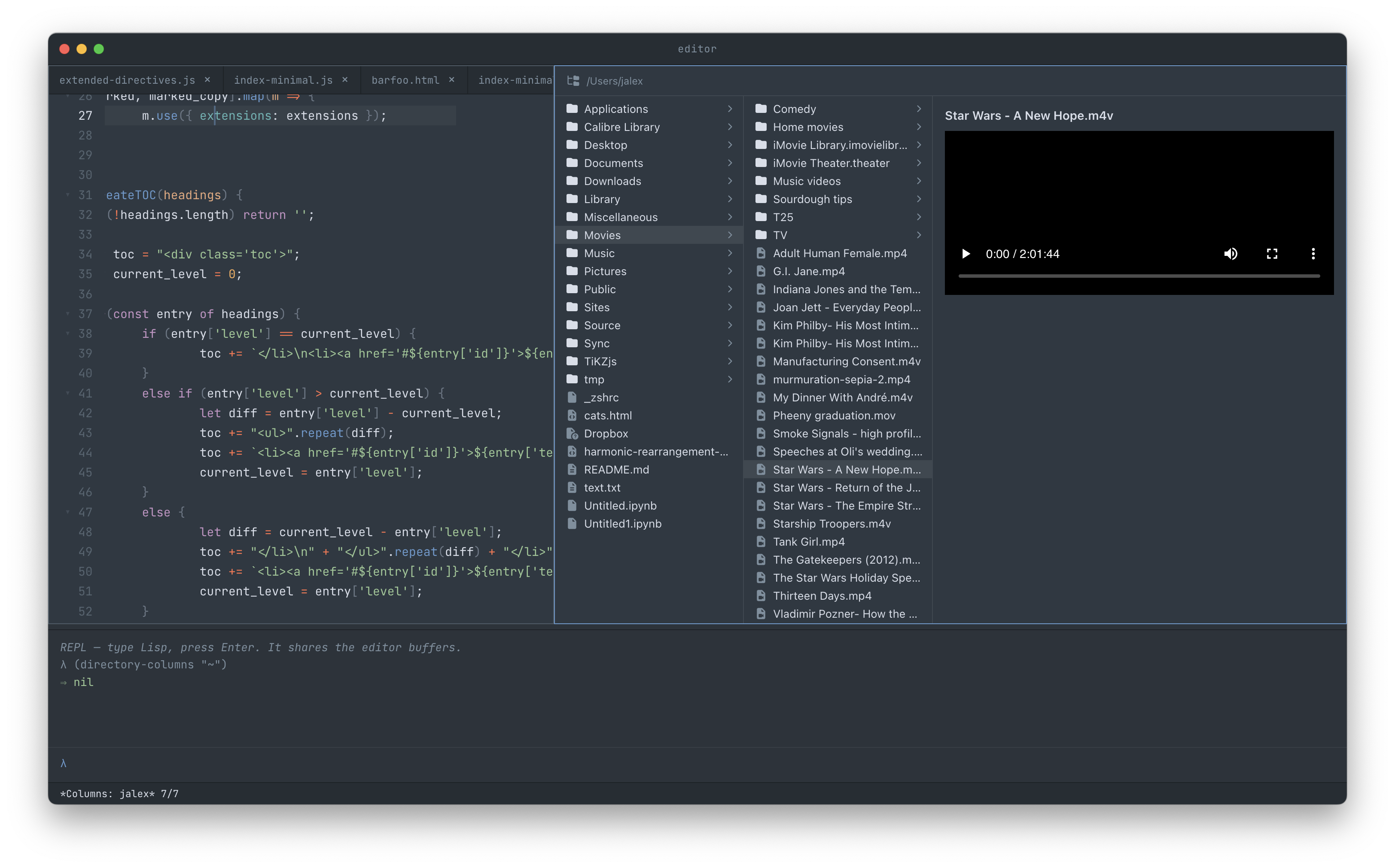
Columns are individually drag-resizable. The preview pane grows to fill whatever horizontal space the columns leave behind.
Preview pane
The preview reads files on demand and renders by kind:
- Images render inline.
- Audio and video get HTML5 controls so you can scrub without opening the file.
- Text goes through the same syntax-highlighting pipeline as the editor — with full tree-sitter injection — and is windowed (virtualised line rendering) so a 10,000-line source file scrolls smoothly.
- Binary shows the size and name.
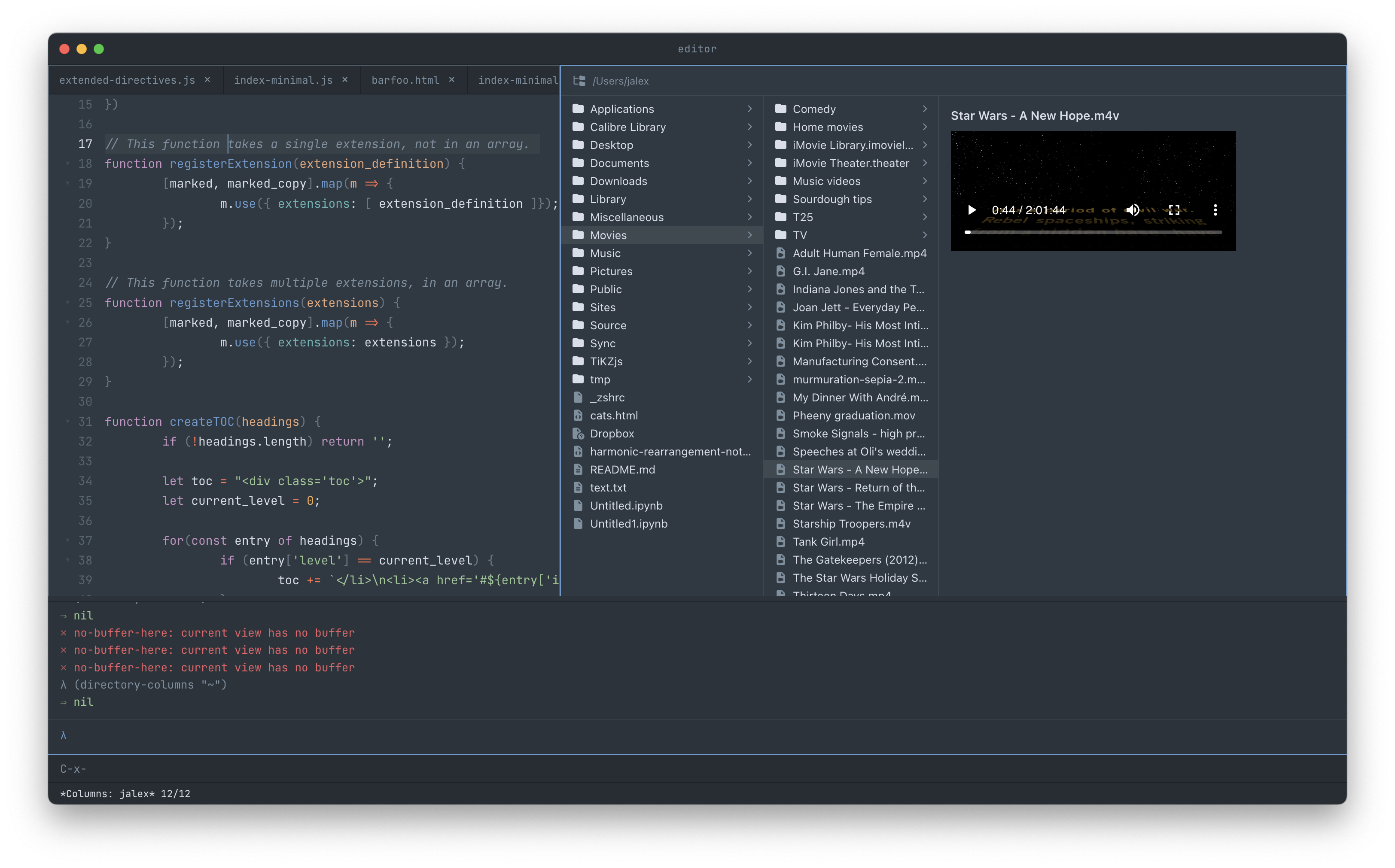
Right-click context menu
Open, Reveal in Finder, Rename…, Move to Trash. The Rename and Trash actions open in-module modal dialogs (Electron's renderer disables window.prompt, so this is a real per-module modal with input, keyboard navigation, and an outside-mousedown dismiss).
Open in new tab, not in place
Double-clicking a file in either directory view opens it as a new tab beside the directory view, promoting the pane to a tabline if it wasn't one already. The directory view stays as the previous tab, so you can keep browsing without re-opening.
Directory views persist across quit by their root path — relaunch lands you on the same folders you were browsing.
Citations New
Godot bundles Citation.js with the BibTeX parser and CSL processor — you can load a .bib file and format entries using any CSL style (APA, Vancouver, Harvard, and several hundred others through the CSL ecosystem).
Two settings drive the defaults:
| Setting | Default | Purpose |
|---|---|---|
*citation-style* | "apa" | CSL style id used by the formatters. |
*citation-bib-path* | "" | Default path to a BibTeX / CSL-JSON file. |
The Lisp surface is intentionally small — primitives, plus convenience wrappers. The intent is for users to build the workflow they want in init.lisp:
;; ~/.config/godot/init.lisp
(custom-apply! '*citation-bib-path* "~/refs.bib")
(custom-apply! '*citation-style* "vancouver")

(defcommand insert-bibliography ()
  "Insert the formatted bibliography from *citation-bib-path*."
  (insert! (format-bibliography (load-default-bibliography))))
The primitives also accept an inline source string, so you can format citations from a buffer, a network response, or anything else that lands as text:
(define bib (citation-parse (buffer-text)))
(format-bibliography bib :style "chicago-author-date" :format "html")
LaTeX, RefTeX & Math Shipped
Godot grew an academic spine: an AUCTeX-style edit / compile / view loop, a RefTeX-style cross-reference and citation system, SyncTeX position sync between source and PDF, and live mathematics — typeset inline in the buffer, not in a separate preview window.
Compile & view
Build the document and open the result in Godot's own PDF view with one chord. The compile runs through a generic process runner with the log parsed into navigable errors; the PDF view reloads in place on each rebuild, holding your scroll position.
| C-c C-c | Compile the document |
| C-c C-v | Open / reload the built PDF in a pane |
RefTeX — labels, references, citations
Insert a label, reference one with completion over every \label in the document, and cite from your bibliography without leaving the keyboard. The reference and citation pickers open in the bottom utility dock, formatted for reading — a citation candidate shows the CSL-formatted entry, not the raw BibTeX key, so you pick the paper you mean.
bib-search — RefTeX in a pane
M-x bib-search opens a full bibliography browser as a side panel that acts on the document without stealing focus: always-on regex search across the doc's .bib (auto-loaded from a RefTeX directive or a Bibliography: header), Chicago-formatted display, sortable, with one-click insertion of a \cite back into the buffer. On macOS it can open the PDF attached to a BibDesk entry straight from its title.
.tex document.Open a
.tex file that has a .bib, run M-x bib-search.SyncTeX
Forward search jumps from a source line to the matching place in the PDF; inverse search (a click in the PDF) jumps back to the source line. Both run in-app, against Godot's own PDF view — no external-viewer round-trip.
Live math preview
Inline and display mathematics typeset where they sit, via MathJax, through a reusable replaced-range widget layer in the view — a span of source is swapped for its rendered form on a uniform line-height grid, so the surrounding text never jumps. The engine is mode-agnostic: it ships wired for LaTeX and Markdown (including the .jmd JMarkdown dialect), and any major mode can register its own math delimiters to get the same inline rendering.
Open a doc with
$...$ / $$...$$; it typesets in place.Themes & Faces
Seven themes ship: dark (Mariana — the calm default), bright (dark chrome with a punchier syntax palette), light (Solarized Light), midnight (a near-black dark), and three newer arrivals — Solarized Dark, Emacs (wheat on dark slate), and Nova (after Panic's editor). Switch via M-x customize → appearance → *theme*.
Adding a theme is data, not code: a define-theme for the chrome variables plus a :default-<name> branch on each face — there is no hardcoded dispatch, so the system resolves any theme it hasn't seen before by falling back face-by-face. Chrome tints are written with color-mix against the foreground rather than fixed overlays, so a light theme never washes a panel out.
Themes are just hash-maps of CSS variables plus per-face defaults. To define your own:
(define-theme 'twilight
  "A custom theme for late nights."
  (hash-map
    "--bg-editor"  "#1a1f2e"
    "--fg"         "#d8dee9"
    "--accent"     "#82aaff"
    ;; ... rest of the chrome variables))

;; Then add a :default-twilight branch to each defface you want to override.
Live customisation: M-x customize-faces opens a buffer with every face, every attribute (foreground, background, weight, slant, underline), and a colour picker. Changes apply immediately. Save to persist via faces.json.
C-h F inspects the face under point, and can create a new face and bind it to a syntax construct on the spot — per-mode or global — so you recolour exactly the token you're looking at without hunting for its name. The base default face owns the editor's typography, which makes font size and family a live knob too: M-x customize → Faces → default → Size, and every view re-renders in step.
The customisation system is general — any defcustom setting shows up in M-x customize with the right widget (text input, colour picker, boolean toggle, dropdown for :choice settings), grouped under the user-facing groups you assign them to.
Media & Jukebox
Images, audio, and video are first-class views, not external viewers.
Image view
Fit-to-window by default; toolbar toggles to actual size. PNG, JPG, GIF, WebP, AVIF, SVG.
Audio view
HTML5 playback with the file's embedded album art alongside the controls. ID3v2 tags surface as the modeline label.
Video view
Same idea: native HTML5 video with controls, sized to the pane.
Jukebox
Open a folder of audio files as a jukebox: a track list with metadata, the current track's album art, and standard transport controls. SPC plays/pauses. Customise the per-track template via *jukebox-track-format* with field substitutions like {title}, {artist}, {album}, {year}.
Audio metadata is editable — M-x on a jukebox row gives you commands for re-writing the embedded tags in place.
Shell Shipped
M-x shell opens a real terminal as a tab. Underneath: xterm.js, fed by a PTY from a Python harness (macOS's BSD script(1) doesn't co-operate with Node, so python3 -c '<pty.spawn>' stands in cross-platform).
The terminal speaks the same ANSI palette as the editor's theme — switch themes and your prompt's colours follow. Multiple shells coexist as separate views, each with its own PTY. Killing the view terminates the child; switching focus between shells re-attaches xterm.js's input stream cleanly.
The Claude Agent New
The most unusual thing in Godot is a pane you talk to. M-x claude opens an in-app Claude — a chat view that drives the claude CLI as a subprocess (on your existing Claude subscription, not metered API credits) — and puts it to work on the running editor.
It does two kinds of work, and decides which from what you ask:
- It builds new views. "Make me a pomodoro timer." "Build a kanban board backed by a JSON file." The agent designs the thing, writes it as a web component plus a Lisp registration in an isolated workspace, and — once you approve — opens it live in a pane. Iterate by asking for changes; each apply reloads the edited component in place.
- It drives the editor. "Add a tab with three paragraphs of lorem ipsum." "Translate the selected paragraph into French." "Make the comment face italic." The agent reads the editor's live state, evaluates Lisp against it, runs commands, and edits your documents in place — the full power surface of the editor, reachable by an agent that understands it.
A reverse channel, not a screen-scrape
The agent doesn't pretend to be a user clicking around. A small MCP server inside Godot exposes the editor as structured tools, and the embedded claude calls them: editor_info (the pane layout and what's focused), read_lisp (read the buffer, the selection, any state), eval_lisp (the whole Lisp surface — edit documents, define faces, bind keys), run_command, apply_extension. It addresses the editor's state directly, so an edit lands where it means to — not where the cursor happens to be.
You stay in the loop
Reads run free; anything that changes the editor or a document surfaces an inline Approve / Deny card showing exactly the Lisp it is about to run. You watch the change before it happens and wave it through — or don't. A setting flips the whole thing to auto when you trust it and want speed.
Run M-x
claude, ask it to edit a selection.It knows the editor
The agent works against two skills that ship with Godot — extend-godot (how to build a view the safe way) and drive-godot (the pane / view / buffer model and how to operate it) — so it reaches for the one supported extension path (a web component + define-element-view) instead of the traps that bite newcomers, and it understands that its own chat is a pane like any other.
Element Views Shipped
Underneath the agent's "build a view" power is a general mechanism: any custom HTML element can be a Godot view, registered in about six lines of Lisp. Write a self-contained web component — it owns its DOM, its state, its keys — and hand it to define-element-view:
(define-element-view pomodoro
  :title    "Pomodoro"
  :module   "vendor/pomodoro/pomodoro.js"   ; defines <pomodoro-timer>
  :tag      "pomodoro-timer"
  :keyboard 'grab)   ; 'grab owns keys · 'share lets chords through · 'off
Now M-x pomodoro opens it in a pane like any built-in view. The component mounts through the editor's single generic element view kind, so it inherits all the pane machinery — splits, tablines, focus, persistence — without touching any of it. :keyboard decides whether the component grabs all keys, shares the editor's chord prefixes, or stays read-only; :fit controls how it sits in the pane; :no-focus makes a helper panel that acts on the active document without stealing focus (how bib-search works).
Components talk back over two documented channels — insert-text (drop text into the active document) and open-external (ask the host to open something) — and run in the renderer sandbox: no node, no fs, fetch over the app's own schemes only.
What it has hosted so far
- A full Atari 2600 emulator (M-x
atari) and a Stella-based emulator view — real arcade hardware, running in a tab. - bib-search, the RefTeX-in-a-pane bibliography browser — a
:no-focushelper panel. - Every view the in-app Claude agent builds for you.
Run M-x
atari.The Lisp
Godot's extension language is a custom Scheme-adjacent Lisp dialect — roughly 2,000 lines of interpreter under packages/lisp/. It is deliberately small and deliberately editor-shaped.
What's there
- Lexical scope with first-class procedures and closures.
- Hash-maps as a primitive type — the literal syntax is
{"key" value …}, the immutable update primitive isassoc. Used everywhere: modes are maps, themes are maps, customisation entries are maps, keymaps are maps. - Symbols and keywords —
'nameis a symbol;:nameis a keyword (most commonly used as a map key). defmacrofor non-hygienic macros — enough for the editor's needs (defcustom,defcommand,defface,define-modeare all macros).- A handful of carefully chosen primitives for strings, lists, regex, and math.
What's not there
- No
call/cc— minibuffer reads use callback-passing instead. - No module system yet — everything loads into one global environment in
STDLIB_FILESorder. - No JIT, no threading. Sync evaluation, single thread, single environment. By design.
The dialect is one of the editor's strongest features. It is not Guile, it is not Common Lisp — but it is exactly the right size for what this editor needs, and every command, every binding, every theme, every setting in the editor is written in it. Reading the source means reading the data.
(defcommand insert-divider ()
  "Insert a horizontal divider at point."
  (insert! "\n---\n"))

(set! the-keymap (assoc the-keymap "C-c -" 'insert-divider))
That's a complete extension: a command and a binding, two forms, evaluable from the REPL or saved into init.lisp.
Architecture
Godot is built in five layers. Each is small enough to read in one sitting; each communicates with the next through a narrow, well-defined surface.
| Layer | Lines | What it does |
|---|---|---|
| L0 — Host | ~11,300 | Electron main + renderer integration. Wires every layer together. |
| L1 — Storage | ~400 | The text storage substrate — a rope-equivalent backing for buffer mutations. |
| L2 — Buffer | ~800 | Editing semantics: cursor sets, marks, edit operations, undo, change events. |
| L3 — View & Pane | ~1,100 | The addressable thing on screen, plus the pane tree it lives in. |
| L4 — Renderer | ~12,000 | Tree-sitter integration, the editor view, all the non-text views (image, audio, video, shell, jukebox, directory-tree, directory-columns, REPL, minibuffer, doc, customize). |
| Lisp | ~7,000 | The custom interpreter (2k) plus the standard library (5k) — every command, mode, theme, face, keymap, and editing primitive the user sees. |
Total: roughly 75k lines of hand-written source — about 108k counting the test suite — atop the vendored tree-sitter grammars and libraries. The renderer and the Lisp standard library have grown most as the recent features landed (element-views, the LaTeX/RefTeX stack, the in-app agent's MCP bridge). The editor's character lives in the seams between these layers — what gets exposed to Lisp, what stays in JavaScript, how state crosses the boundary.
The Manual Shipped
Godot documents itself. C-h d opens a three-book reference in a sidebar pane: a user manual, a function reference covering 478 primitives and commands, and a thirteen-chapter guide to the Lisp — written to be read start to finish, not just grepped. It is built from source (a texinfo-style markdown pipeline → HTML) and ships with the app, so it's available offline, in the editor, while you work.
The live help keys complement it: C-h k describes a key, C-h f a command, C-h F the face under point — each pulling the same docstrings the manual is generated from. Because every command is a defcommand with a docstring, the documentation and the code can't drift apart.
Keyboard Shortcuts
A reference. On macOS, Cmd normalises to C-; on Linux / Windows, Ctrl does. Modifiers stack in order C- M- S-.
Files & views
| C-x C-f | Find a file |
| C-x C-s | Save the current buffer |
| C-x b | Switch to a view by name |
| C-x C-b | Buffer menu (list of all views) |
| C-x k | Kill the current view |
| C-x → / C-x ← | Next / previous view in the focused tabline |
Panes
| C-x 2 | Split vertically |
| C-x 3 | Split horizontally |
| C-x 0 | Close the focused pane (view stays alive) |
| C-x 1 | Maximize the focused pane (close every other) |
| C-x o | Move focus to the next pane |
| C-x C-← / → / ↑ / ↓ | Move focus spatially |
| C-x x | Send the focused view to the next pane |
| C-x X | Swap views with the next pane |
Editing
| C-Space | Set the mark |
| C-w / M-w | Cut / copy the region |
| C-y / M-y | Yank / yank-pop the kill ring |
| C-z / C-S-z | Undo / redo |
| C-= | Expand region semantically |
| M-q | Fill paragraph |
Multi-cursor
| C-c d | Add a cursor at the next match |
| C-c D | Select every occurrence |
| ESC | Deselect (cursors remain) |
| C-g | Reset everything — collapse to primary |
Folding
| C-c TAB | Toggle the fold at point |
| C-c C-, / C-c C-. | Fold all / unfold all |
Search
| C-s / C-r | Incremental search forward / backward |
| C-M-s / C-M-r | Regex incremental search |
| M-% | Query-replace |
| M-s o | Occur — list every match in a new view |
Help & customisation
| C-h k | Describe a key |
| C-h f | Describe a command |
| C-h F | Describe the face under point |
M-x customize | Customise everything |
M-x customize-faces | Live-edit the face palette |
Status
Godot is pre-release, but moving fast. The architecture is settled, the suite is green at 2,534 tests, and the maintainer uses it daily.
Recently landed
- The in-app Claude agent — converse with a Claude that builds views and drives the editor (see The Claude Agent).
- Element views — host any web component as a view; an Atari emulator was the first client.
- The LaTeX / RefTeX / SyncTeX stack with inline math preview, and the bib-search pane.
- Snippets, edit-tracking bookmarks, and a three-book in-app manual.
- Three more themes (Solarized Dark, Emacs, Nova) and a live font-size / family knob.
Still ahead
- LSP autocomplete In flight — TypeScript LSP with diagnostics and hover, on a feature branch.
- Git integration Planned — diff gutter, blame, basic conflict UI.
- Multi-window Planned — multiple
BrowserWindows sharing the Lisp VM. - Broader use — one author drives it daily; wider use will surface paper cuts not yet seen.
An unsigned macOS app (.dmg / .zip) now builds and runs, validated. Code-signing + notarization come next, then a Windows installer and a Linux package. Until those land, the build path is the source tree.
The project lives at the time of writing as a single-author Lisp-extensible editor experiment. Whether it crosses the threshold from "interesting design" to "the editor I reach for first in the morning" depends on whether the remaining gaps close before the maintainer's attention wanders.
The waiting, as the play knows, is the point.